


Block Craft 3D: Planet Craft
4.18.95K Reviews
App Specs
- Version
- 6.4.6
- Updated On
- License
- Free
- Downloads
- 50,000,000+
- Developer
- Playlabs LLC
- Categories
- Adventure
- Platform
- Android
Screenshots
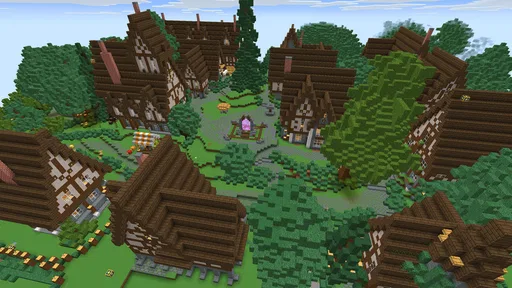
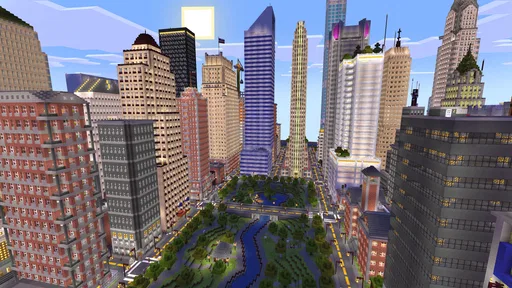
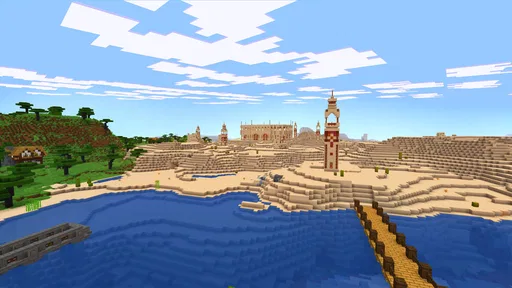
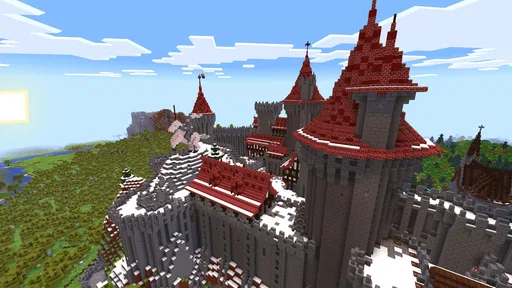
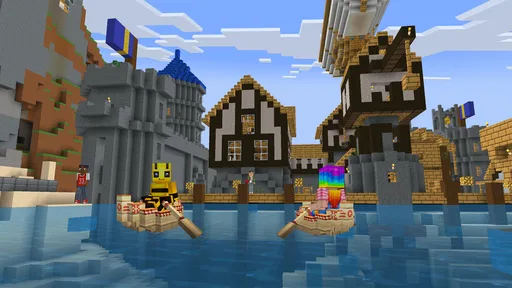
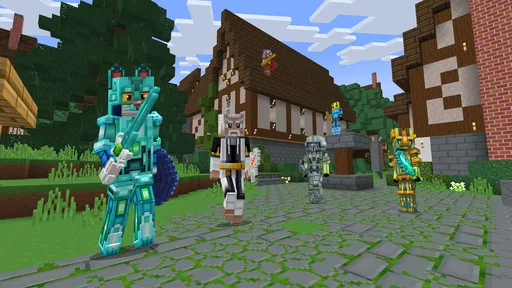
 Analysis by AppCompare
I usually judge a building game by what happens after I place the first block: do I get a clear response, a reason to keep shaping the space, and an easy point at which to stop? Block Craft 3D: Planet Craft is an adventure game built around that simple cycle. I found it approachable when I wanted to make something without first learning a complicated set of rules, though its open-ended nature means the fun depends on whether you enjoy setting your own goals.
Starting with a small build
My best advice is to begin with a compact idea rather than a huge castle. A little house, a path, or a simple meeting spot gives you a clear first task: choose a shape, place blocks, then step back and see what needs adjusting. That first action is satisfying because the result is visible right away. If you start with an enormous plan, the same freedom can feel less like possibility and more like having no direction.
The controls are intuitive enough for a casual session, and the game’s block-based view makes it easy to think in parts: a wall, an opening, a roofline, then a detail that gives the build personality. I like this rhythm for short breaks because I can make progress without needing to remember a long chain of objectives. A useful habit is to decide on one small finishing detail before I begin; that keeps a quick visit from turning into an unfinished project with no obvious stopping point.
Feedback that keeps a project moving
Once I have a basic outline, the game gives me a steady visual response as the structure takes shape. I can see whether a room feels cramped, whether a roof needs another layer, or whether a path should lead somewhere more useful. Flying is particularly helpful here. Rather than guessing from ground level, I can look down at the layout and notice awkward gaps or uneven proportions before adding more decoration.
That overhead view is not only for impressive, large-scale builds. I use it as a quick quality check even on a modest home: does the entrance face the right way, can I read the shape of the building, and does the surrounding space feel intentional? This is one of the better ways to avoid spending time on detail that does not improve the overall design. The trade-off is that easy movement and a wide building canvas can tempt me to expand before I have decided what the space is for.
Progress, rewards, and useful goals
Experience points and coins give building a second layer of motivation. As I make progress, I can work toward unlocking more blocks and items, which gives me a practical reason to finish one idea before jumping to the next. The reward loop feels most useful when I treat it as a prompt rather than a demand: I choose a small project, complete it, and let the next unlock influence what I might try afterward.
Quests and challenges help when I am short on inspiration. Instead of staring at an empty area and asking myself what to build, I can use a task as a starting point and adapt the result to my own taste. They also encourage me to try actions I might otherwise overlook. I would not treat them as a substitute for creative freedom, though. If I am in the mood to follow a precise, story-led adventure, a building-focused game can feel too self-directed; here, the satisfaction comes mainly from making the space mine.
Worth Reading Before You Choose

Flipboard Shows What News Apps Must Do Beyond the Feed

Switching to Android Auto Means Rethinking Your Driving Routine

Google Calendar Makes a Crowded Week Easier to Manage

Ludo King Makes the Most of the Minutes Between Plans

Baby Panda World Brings Quick Play to Modern Phones, but Its Game Library Feels Busy

ESPN’s Live Game View Makes Following Close Games Easier
Visiting other worlds without losing your own plan
The social side adds a helpful source of ideas. Visiting friends’ worlds lets me see how other players arrange their builds, and messages make it possible to leave a note or exchange a tip. I find this most valuable when I go with a question in mind, such as how someone handled a roof or made a public-looking area feel welcoming. Browsing without a purpose can be enjoyable too, but it is easy to come away admiring someone else’s work without knowing what to try in my own world.
For a realistic everyday session, I might open the game after school or during a quiet break, spend a few minutes extending a path or adjusting a small building, then visit a friend’s creation for a fresh idea. That gives the session a natural shape: build, inspect, get inspiration, and stop before the next project takes over. If I have a longer stretch of time, I can turn the same routine into a more ambitious plan, checking the layout from above between stages rather than decorating everything at once.
Block Craft 3D: Planet Craft is free to play, with in-app purchases priced from $0.99 to $99.99 per item. I would approach those purchases carefully: the game already offers a progress path through building, quests, experience, and coins, so I would first play at my own pace and decide whether an item is genuinely worth paying for. The broad price range makes it sensible to check each purchase before confirming it, particularly if a child is playing.
Where it fits among building games
Compared with a more survival-oriented block game, this one is a better fit when I want the emphasis on making a place and exploring other players’ creations rather than managing a demanding sequence of threats. Compared with a purely solitary creative sandbox, its visits and messages give me a social reason to return. That balance is appealing, but it also means it is not the best choice for every builder: players who want strict survival pressure, a tightly guided campaign, or a detailed construction simulator may prefer a game designed around those specific goals.
The clearest limitation is the freedom itself. The game can give me tools and tasks, but it cannot decide what I want to build or make every project feel meaningful. If I need a strong narrative or constant new instructions, I may lose interest once the novelty of placing blocks fades. I also find that large plans benefit from breaking them into sections; otherwise, the open space can make progress feel slow even when I have been building for a while.
Who will enjoy the loop—and who may not
Playlabs LLC has made a casual adventure game that is welcoming to players who like visual creativity, gradual unlocking, and low-pressure exploration. Its Everyone age rating makes it suitable for a broad audience, and I can see it working well for a child who enjoys designing spaces or for an adult who wants a relaxed project between other tasks. It has a 4.1 average from around 209,000 ratings and over 50 million installs, which suggests a substantial audience, though popularity alone does not guarantee that its open-ended style will suit you.
I would skip it if my main priority were realistic building tools, a tightly paced plot, or competitive action. I would also think twice if I dislike games that ask me to supply my own goals. On the other hand, if I enjoy taking a vague idea and making it visible one block at a time, I can get a lot out of short sessions without needing to treat every build as a masterpiece.
It was released on August 21, 2015, and version 6.4.1 requires Android 6.0 or later. That makes compatibility worth checking before downloading, especially on an older device. The game is free, but the optional purchases are a real consideration for families; setting expectations before play is an easy way to keep a relaxed building session from turning into an unexpected spending decision.
The World of Block Craft Awaits
So, what’s the deal with Block Craft 3D: Planet Craft? Imagine a world where you’re the architect, builder, and designer all rolled into one. The game throws you into a vibrant, blocky universe where you can build anything from skyscrapers to cozy cottages. It’s kind of like having a digital sandbox, but way cooler.
Building Your Dream
When I first started playing, I was blown away by the sheer freedom it offers. The controls are intuitive, making it easy to get started even if you’re not a seasoned gamer. You can choose from a variety of blocks and materials to create structures that reflect your personal style. Whether you’re into modern architecture or prefer rustic vibes, the game has something for everyone.
One of the coolest features is the ability to fly. Yep, you heard me right! You can soar through the skies to get a bird’s-eye view of your creation, which is a serious game-changer when planning out massive builds. Plus, it’s just plain fun.
Social Features and Community
What makes the game even more engaging is its social aspect. You can visit your friends’ worlds to get inspiration or simply marvel at their creativity. It’s like a never-ending showcase of virtual masterpieces. The community is vibrant and active, so there’s always something new to see.
There’s also a feature where you can leave messages for other players, turning the game into a social hub. It’s a great way to connect with other creators and exchange tips and tricks.
Leveling Up and Customization
As you progress, you earn experience points and coins, which you can use to unlock new blocks and items. It’s a rewarding system that keeps you motivated to keep building. The customization options are extensive, allowing you to personalize your avatar and make your world truly unique.
The game also includes quests and challenges that add a layer of excitement. Completing these tasks not only boosts your level but also enhances your building skills. It’s a perfect blend of fun and learning.
Graphics and Sound
The graphics, while blocky, are colorful and charming. They create a nostalgic vibe reminiscent of classic sandbox games. The sound effects and music add to the atmosphere, making the gameplay experience immersive and enjoyable.
I found myself getting lost in the sound of my footsteps as I wandered through my creations, which is a testament to the game’s ability to draw you into its world.
Is It Worth Your Time?
In a word: absolutely. Block Craft 3D: Planet Craft is a delightful escape from reality, offering endless possibilities for creativity and exploration. It’s easy to pick up, hard to put down, and packed with features that cater to both casual players and hardcore builders.
If you’re looking for a game that lets you express your creativity while connecting with a community of like-minded builders, then this is definitely worth a download. Grab your virtual tools and start crafting your dream world today!
Pros
- Engaging sandbox gameplay.
- Vibrant and colorful graphics.
- User-friendly interface.
- Multiplayer mode available.
- Frequent updates and new features.
Cons
- In-app purchases can be pricey.
- Ads may interrupt gameplay.
- Limited offline functionality.
- Some bugs during multiplayer.
- Resource gathering can be slow.
FAQs for Block Craft 3D: Planet Craft
What is Block Craft 3D: Planet Craft about?
Block Craft 3D: Planet Craft is a sandbox-style building game that allows players to construct their own worlds using blocks. With a variety of materials and tools at your disposal, you can create intricate structures, explore different terrains, and engage with a vibrant community. The game emphasizes creativity and exploration, making it appealing to players of all ages.
Is Block Craft 3D: Planet Craft free to play?
Yes, Block Craft 3D: Planet Craft is free to download and play. However, it does offer in-app purchases for certain items, enhancements, and resources. These purchases can enhance gameplay but are not necessary to enjoy the full experience. Players can choose to invest in these options to accelerate progress or unlock exclusive content.
Can I play Block Craft 3D: Planet Craft offline?
Block Craft 3D: Planet Craft can be played offline, allowing you to build and explore without an internet connection. However, certain features, like sharing your creations with the community or downloading others' designs, require an online connection. Offline play is perfect for uninterrupted creativity when you're on the go.
Are there multiplayer features in Block Craft 3D: Planet Craft?
Yes, Block Craft 3D: Planet Craft includes multiplayer features that allow you to interact with other players. You can visit friends’ worlds, collaborate on projects, and share designs. The multiplayer aspect adds a social dimension to the game, encouraging cooperation and inspiration from other players’ creations.
What are the system requirements for Block Craft 3D: Planet Craft?
Block Craft 3D: Planet Craft is designed to run smoothly on most modern Android and iOS devices. However, for optimal performance, it's recommended to have a device with updated software and sufficient storage space. The game is lightweight, but ensuring your device meets these requirements will provide the best experience.


